

We tested four popular hardware wallets — Ledger Nano X, Trezor Safe 5, SafePal S1 Pro, and NGRAVE Zero — across security, usability, price, and real user feedback from crypto twitter. Here’s how they stack up.
Our top picks at a glance
How we evaluated
We tested each wallet on security certifications, coin support, connectivity (USB, Bluetooth, QR), companion app quality, build materials, price, and backup options. We also pulled real user feedback from crypto twitter to check whether the specs hold up in practice.
Ledger Nano X review
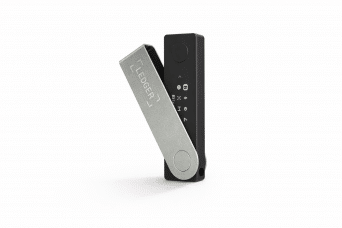
The Ledger Nano X is Ledger’s flagship hardware wallet, priced at $99. It connects via Bluetooth and USB-C, pairs with the Ledger Wallet app on mobile, and supports over 15,000 coins and tokens — making it the widest-coverage option in this lineup.
Features deep-dive: The Nano X is compact (72mm x 18.6mm x 11.7mm, 34g) with a 128×64 OLED display for verifying transactions.
It runs an ST33J2M0 Secure Element chip with EAL5+ certification. The Ledger Wallet app (formerly Ledger Live) handles buying, swapping, staking, and NFT management.
Battery is 100 mAh — fine for sessions but a known weak point long-term, with some users reporting failures within a couple of years.
Pricing/Fees:
| Item | Cost |
|---|---|
| Ledger Nano X | $99 |
| Transaction Fees | Network-dependent (via Ledger Wallet app) |
Buy the Ledger Nano X at Ledger.com
What we like
- Supports 15,000+ coins and tokens, the most of any wallet here.
- Bluetooth pairing makes it easy to use with your phone.
- Ledger Wallet app covers staking, swapping, and NFTs in one place.
- Small and light enough to carry daily.
What we don’t like
- Battery lasts 3-5 years before it needs replacing.
- Bluetooth is convenient but adds a wireless attack surface.
- Ledger Wallet app gets sluggish with large portfolios.
What real users say
Ledger still carries baggage from the Recover controversy, but sentiment on X has softened — most users who stuck with the Nano X say they’re fine with it now that the feature is opt-in.
The main complaints in 2026 are hardware-related: battery dying early and Bluetooth pairing dropping out.

The Ledger Wallet app also gets heat for being bloated and slow on big portfolios, though altcoin-heavy users say nothing else matches its token coverage.
Our Rating: 8.5/10
Trezor Safe 5 review
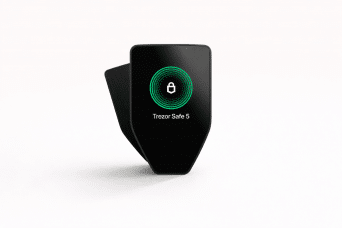
The Trezor Safe 5 replaces the Model T at $129. The big upgrades are a color touchscreen with haptic feedback and Bluetooth 5.2 — but the core selling point is the same as always: fully open-source firmware that anyone can audit.
Features deep-dive: The screen is 1.54 inches (240×240) with Gorilla Glass 3, and the haptic motor (Trezor Touch engine) gives physical confirmation on inputs.
Security runs on an OPTIGA Trust M Secure Element, EAL6+ certified, with an NDA-free design so independent researchers can review the hardware.
It connects via USB-C or Bluetooth 5.2 and has a MicroSD slot. Trezor Suite handles transactions, staking (Ethereum via Everstake), and portfolio tracking.
Pricing/Fees:
| Item | Cost |
|---|---|
| Trezor Safe 5 | $129 |
| Transaction Fees | Network-dependent (via Trezor Suite) |
Buy the Trezor Safe 5 at Trezor.io
What we like
- Firmware is fully open-source and publicly auditable — no NDA required.
- Color touchscreen and haptic feedback make it the best-feeling Trezor to use.
- EAL6+ secure element, plus Shamir’s Secret Sharing if you want to split your backup across multiple locations.
- Ethereum staking built into Trezor Suite via Everstake.
What we don’t like
- Trezor Suite is clean but thin — no built-in swap aggregator or NFT management like Ledger Wallet has.
- The plastic casing feels cheap for $129.
What real users say
On X, the Trezor Safe 5 gets a lot of love as the anti-Ledger pick — open-source, no Recover-style surprises. Users like that Trezor Suite is simple and stays out of the way, though DeFi-heavy traders say it’s too barebones compared to Ledger Wallet.
The plastic build comes up a lot — people don’t love paying $129 for something that feels like it costs half that — but almost nobody reports actual hardware failures.
Our Rating: 9/10
SafePal S1 Pro review
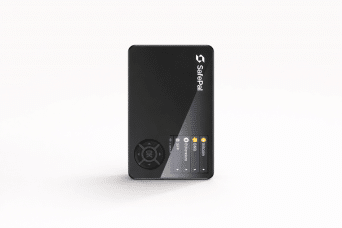
The SafePal S1 Pro costs $89 and is fully air-gapped — no USB, no Bluetooth. Everything runs through QR codes via the built-in camera. It supports over 200 blockchains, which is a lot of coverage for a wallet at this price.
Features Deep-Dive: The screen is a 1.3-inch IPS display (480×600) behind tempered glass, with an aluminum alloy body.
The secure chip is EAL6+ certified, and the 500 mAh battery lasts up to 25 days on standby.
The SafePal App handles transactions through QR scanning and gives access to cross-chain DeFi and banking features in 60+ countries.
Pricing/Fees:
| Item | Cost |
|---|---|
| SafePal S1 Pro | $89 |
| Transaction Fees | Network-dependent (via SafePal App) |
Buy the SafePal S1 Pro at SafePal.com
What we like
- Under $90 — the cheapest wallet in this roundup by a wide margin.
- Fully air-gapped, so there’s no wireless or wired attack surface at all.
- Supports 200+ blockchains, including a lot of smaller chains the others miss.
What we don’t like
- Despite the aluminum spec, the build feels flimsy in hand.
- Much smaller user base than Ledger or Trezor, which means less community support and fewer third-party guides.
What real users say
SafePal’s biggest fans tend to be Binance users who like the tight integration and the sub-$90 price. It gets recommended a lot as a first hardware wallet. But the skeptics are loud too — a common take is that SafePal spends more on marketing than on the product itself, and nobody seems to trust it with serious money.
Build quality comes up constantly: people say it feels like a $30 device, not a $90 one.
Our Rating: 7.5/10
NGRAVE Zero review
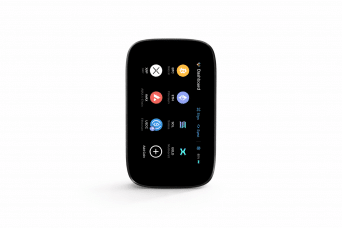
The NGRAVE Zero costs $398 — by far the most expensive wallet here. It’s fully air-gapped with a fingerprint sensor, aimed squarely at people holding large amounts of crypto who want maximum offline security.
Features deep-dive: The screen is 4 inches (480×800), the largest in this roundup, with a 640×480 camera for QR code scanning.
It runs a dual-core ARM processor and the software is EAL7 certified, though that certification doesn’t cover the full device.
It supports 3,500+ coins.
Backup uses NGRAVE’s proprietary ‘Perfect Key’ system engraved on stainless steel plates rather than a standard seed phrase card.
The NGRAVE LIQUID app handles all transactions through QR codes — the device never connects to anything.
Pricing/Fees:
| Item | Cost |
|---|---|
| NGRAVE Zero | $398 |
| Transaction Fees | Network-dependent (via NGRAVE LIQUID) |
Buy the NGRAVE Zero at NGRAVE.io (Currently sold out)
What we like
- Fully air-gapped with fingerprint authentication — the most locked-down wallet in this lineup.
- Built from metal alloy with IP55 dust and water resistance. Feels like it could survive a drop.
- Backup is engraved on stainless steel plates instead of written on a paper card.
What we don’t like
- $398 is hard to justify unless you’re holding six figures or more in crypto.
- Setup is involved and daily use is slower than connected wallets — more security than most people need.
What real users say
NGRAVE barely shows up on X compared to the others — it’s a small user base. The people who do talk about it tend to be whales who like the air-gapped setup and the build quality, and they’ll say it’s the only wallet they’d trust with seven figures.
Everyone else says the same thing: too expensive, too complicated, and hard to recommend when so few people actually use it. Like SafePal, there’s a sense that the marketing runs ahead of the adoption.
Our Rating: 8/10
Side-by-side comparison
| Criteria | Ledger Nano X | Trezor Safe 5 | SafePal S1 Pro | NGRAVE Zero |
|---|---|---|---|---|
| Price | $99 | $129 | $90 | $398 |
| Security Certification | EAL5+ | EAL6+ | EAL6+ | EAL7 (software) |
| Supported Coins | 15,000+ | Thousands | 200+ blockchains | 3,500+ |
| Connectivity | USB-C, Bluetooth | USB-C, Bluetooth | Air-Gapped (QR Code) | Air-Gapped (QR Code) |
| Display | 128×64 OLED | 1.54″ Color (240×240) | 1.3″ IPS (480×600) | 4″ Color (480×800) |
| Open-Source | Partially | Fully | Partially | Limited |
| Backup Method | BIP39 (24-word) | BIP39/SLIP39 | BIP39 | Proprietary “Perfect Key” |
| Build Quality | Good (Metal) | Average (Plastic) | Poor (Flimsy) | Excellent (Alloy) |
| Companion App | Ledger Wallet (Feature-Rich) | Trezor Suite (Simple) | SafePal App (DeFi Focus) | NGRAVE LIQUID (Basic) |
Which one should you choose?
Best Overall: Trezor Safe 5. Its blend of open-source security, modern usability features, and reasonable pricing makes it the top pick for most users in 2026.
Best for Beginners: Ledger Nano X. With extensive coin support and a user-friendly mobile app, it lowers the entry barrier for new crypto users.
Best for Low Fees: SafePal S1 Pro. At under $90, it’s the most affordable option with solid security for cost-conscious buyers.
Best for Security/Privacy: NGRAVE Zero. Its air-gapped design and biometric features cater to those prioritizing maximum protection.
Best for Advanced Users/Traders: Ledger Nano X. Its broad blockchain compatibility and DeFi integrations suit active portfolio managers.
What the crypto community actually says
Trezor Safe 5 is the crowd favorite right now — open-source, no drama, and surprisingly popular with whales who just want something simple and trustworthy.
Ledger keeps its audience with altcoin traders who need the token coverage, but the Recover backlash and battery complaints haven’t gone away.
SafePal and NGRAVE both have a credibility gap: SafePal feels like it’s marketed harder than it’s adopted, and NGRAVE is too expensive and niche for most people to have an opinion on at all.
The one thing everyone agrees on — every wallet in this category still has room to improve on build quality and software
FAQs
What is the best hardware wallet for 2026?
We’d go with the Trezor Safe 5. It’s fully open-source, EAL6+ certified, and the new touchscreen makes it the most usable Trezor yet. It’s the easiest recommendation for most people.
Is Ledger still safe after the Recover controversy?
Yes. The Recover feature is opt-in and the EAL5+ secure element hasn’t changed. Ledger has also been more transparent since the backlash. That said, some users on X still don’t trust them after the 2020 data leak and the way Recover was initially rolled out — so it depends on where your comfort level is.
Are air-gapped wallets like SafePal and NGRAVE worth it?
If you want zero wireless or wired attack surface, yes. But there are tradeoffs: SafePal’s build feels cheap for what it is, and NGRAVE costs $398, which only makes sense if you’re holding a lot of crypto. For most people, a connected wallet with a good secure element is plenty.
Which hardware wallet supports the most tokens?
Ledger Nano X, by a lot — over 15,000 coins and tokens. SafePal covers 200+ blockchains, which is second in chain variety but a different metric. Trezor and NGRAVE support thousands but don’t compete on sheer numbers.
Is Trezor’s open-source firmware a big advantage?
It is if you care about verifiability. Anyone can audit Trezor’s code without signing an NDA. Ledger’s firmware is partially closed and NGRAVE’s is limited too, so you’re taking their word for more of the stack. For most users this won’t change daily experience, but for the security-conscious crowd it’s a dealbreaker.
How important is build quality in a hardware wallet?
Depends on how you use it. If it lives in a drawer, it barely matters. If you carry it around, the Ledger and NGRAVE feel solid — metal bodies, decent weight. The Trezor Safe 5 and SafePal S1 Pro both feel lighter and cheaper in hand, which is the most common complaint about both.
Can I use a hardware wallet for DeFi and NFTs?
Ledger Nano X has the best DeFi and NFT support through the Ledger Wallet app. SafePal’s app also connects to DeFi protocols across chains. Trezor Suite is more limited here — it handles basics but doesn’t have a built-in NFT manager or swap aggregator.
Final Verdict
The Trezor Safe 5 is our top pick for 2026. Open-source firmware, EAL6+ certification, and the best interface Trezor has made — it’s the wallet we’d recommend to most people.
Ledger Nano X is still the move if you need massive token coverage or use DeFi heavily, but the Recover baggage and battery issues keep it in second place.
SafePal S1 Pro is worth it if you want air-gapped security for under $90 and can live with the build quality.
NGRAVE Zero is the best-secured wallet here on paper, but at $398 it only makes sense if you’re protecting a serious bag.
Disclosure: This article contains affiliate links. See our full disclosure below.